You can do this when creating a new App from Visual Studio by selecting Authentication type -> Microsoft identity platform. This will configure the template for you and even register the App if the account you authenticate to Visual Studio with has privilege.
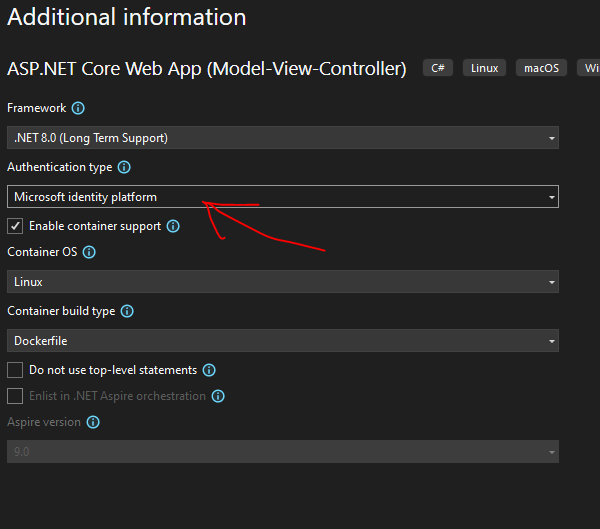
In my case, I needed to add Microsoft identity platform to an existing ASP.NET Core MVC app. The Visual Studio template handles this automatically, but I had to wire it in manually. This post is the exact sequence I followed.
1. Register the app with Entra
In Microsoft Entra admin center, go to App registrations and open your app (or create one). Under Authentication, add your redirect URI(s) under Web platform:
1 | https://localhost:5001/signin-oidc |
Record the Application (client) ID and Directory (tenant) ID—you’ll need these in appsettings.json.
Docs: Register an app • Add redirect URI
2. Install the identity packages
1 | dotnet add package Microsoft.AspNetCore.Authentication.OpenIdConnect --version 8.0.15 |
Docs: Microsoft.Identity.Web
3. Configure authentication in Program.cs
1 | using Microsoft.AspNetCore.Authentication.OpenIdConnect; |
This sets up OpenID Connect with AddMicrosoftIdentityWebApp(...) and adds the built-in Microsoft Identity UI (which provides the Account controller).
Docs: AddMicrosoftIdentityWebApp
4. Wire up the middleware in Program.cs
1 | app.UseHttpsRedirection(); |
The order matters: UseAuthentication() must come before UseAuthorization(), and both must come after UseRouting().
Docs: Middleware order
5. Add AzureAd config to appsettings.json
1 | "AzureAd": { |
Make sure CallbackPath matches your redirect URI path from the app registration.
Docs: Configure appsettings.json
6. Add sign-in/sign-out links to your layout
Create /Views/Shared/_LoginPartial.cshtml:
1 | <ul class="navbar-nav"> |
Then add it to /Views/Shared/_Layout.cshtml:
1 | <partial name="_LoginPartial" /> |
The MicrosoftIdentity area and Account controller are built in to Microsoft.Identity.Web.UI.
7. Protect your endpoints
Add [Authorize] to controllers/actions you want to protect:
1 | [] |
Or enforce it globally in Program.cs (then use [AllowAnonymous] where needed):
1 | builder.Services.AddControllersWithViews(options => |
Docs: Simple authorization
8. If you get AADSTS50011 (redirect URI mismatch)
This error means your app is sending a different redirect URI than what’s registered. Check:
- Scheme matches (
httpvshttps) - Host matches exactly
- Path is
/signin-oidc - It’s registered in app registration → Authentication → Web
Docs: Troubleshoot AADSTS50011
9. If hosted behind Azure Container Apps or reverse proxy
When a reverse proxy terminates TLS, your app needs to read forwarded headers to know the request is really HTTPS.
In Program.cs:
1 | using Microsoft.AspNetCore.HttpOverrides; |
This is especially important for OIDC redirect URIs—if your app thinks the request is http instead of https, the redirect URI won’t match what’s registered.