Updated 15/05/2026
These are notes I made while investigating RAG (Retrieval-Augmented Generation). I found a heap of useful information in the Dometrain course Let’s Build It: AI Chatbot with RAG in .NET Using Your Data by James Charlesworth. I highly recommend completing the course and supporting Dometrain ❤️
Its important to note that the notes and collections captured here are not an exhaustive list, as I learn and discover more I do update all my posts.
Terms
RAG has associated terms that we need to understand before building retrieval systems
- RAG - Retrieval Augmented Generation
- Vector database - a database designed to store embeddings (numeric vectors) and retrieve the most similar items quickly
- Embeddings - a numerical representation of text where similar meaning ends up close together in vector space; this is what allows semantic search to find relevant content even when exact keywords do not match
- Vector Retrieval Scoring Metrics - part of the retrieval pipeline are similarity methods which are used to find the nearest vectors to a query embedding, these are the most popular but are not all the methods:
- Cosine Similarity
- Euclidean Distance
- Dot Product
- Token - the chunks text is split into for model input and output; token count affects context limits and cost
- HYDE - Hypothetical Document Embeddings, where the model generates a hypothetical answer first and embeds that text to improve retrieval
- Tools - functions or APIs exposed to an AI agent so it can act beyond text generation
- LLM - Large language model
- Lexical/Keyword Search - exact or partial term matching against indexed text, without understanding meaning
- Semantic Search - searches by meaning using embeddings, so related phrasing can match even when exact words differ
- Prompt Stuffing - putting source content directly into the prompt; fine for small datasets, but for larger corpora retrieval from a vector database scales better
- Dimensions - the number of values in each embedding vector (for example 1536); more dimensions can capture more nuance, but increase storage and compute costs
Tokens
Open AI has a free tokenizer tool avalible at https://platform.openai.com/tokenizer. I used their tool to create the example below.
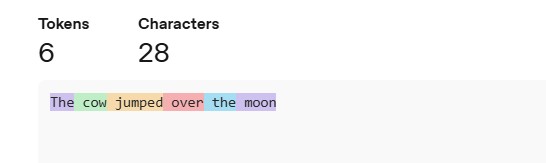
“A helpful rule of thumb is that one token generally corresponds to ~4 characters of text for common English text. This translates to roughly ¾ of a word (so 100 tokens ~= 75 words)”
Models
These can come from any provider like OpenAI, Googles Gemini, Voyage AI ect
Embedding Models
Trained not to complete text but to look at the entire input text and work out what it means. The result is a vector representation of what it means. Similar neural network architecture to completion models, still use attention & transformer layers but are special models specifically for doing embeddings.
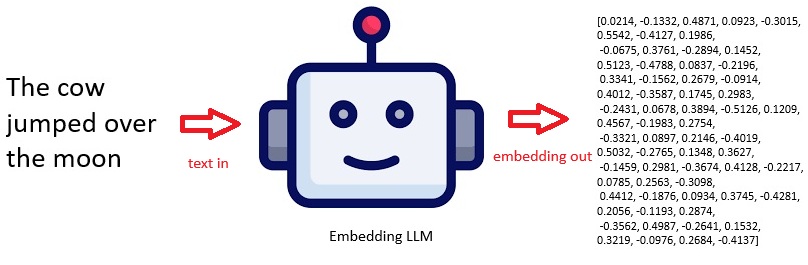
- The above is a representative embedding, not from a specific fixed model instance.
- Real embeddings (e.g. from OpenAI embeddings API) are typically hundreds to thousands of dimensions and deterministic per model.
- If you need exact reproducible vectors, you must specify the exact model (e.g. text-embedding-3-large) and compute it via API.
Completion Models
Embedding models are not the same as Completion models, most people know about ChatGPT which is popular to answer questions because it can identify patterns in text. These patterns can be used to predict the next word in a string.
So with completion a special type of neural network architecture in the transformer layer, in the LLM creates attention mechanisms. We give it text like “The cow jumped over the” and it works out the meaning of this text which it uses to predict the next word in a sentence is going to be. This has a set of probability distributions for what the next word is going to be. Each time a word is added to the sentence, the process repeats.
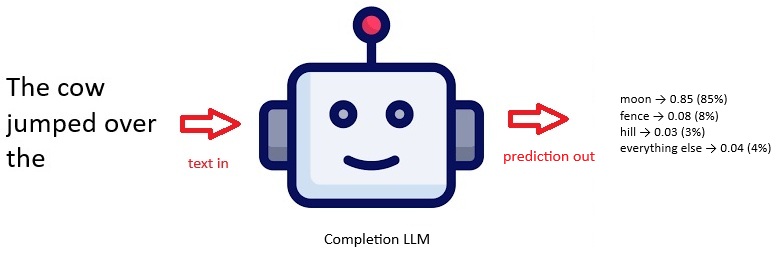
So for the completion example above:
- moon — very high probability (classic phrase)
- fence — moderate probability (common real-world continuation)
- hill — lower but plausible
Note that 0.85 is a probability, not a percentage. But you can convert it to a percentage: 0.85 = 85%. So building on the example: moon → 0.85 means the model assigns about an 85% chance that “moon” is the next token. These probabilities are relative to all possible next tokens, and they should sum to ~1 (or 100%) across the whole vocabulary.
Vectors
In physics, a vector is defined as a quantity that has a magnitude and a direction. Generally vectors are stored with high dimensions as explained below, you can however use Principal Component Analysis PCA Reduction to reduce the vectors if needed.
Sparse Vs Dense
Vectors can be sparse or dense. A dense vector stores every value, including zeros. For example: [0, 0, 5, 0, 0, 3, 0, 0, 0, 2].
A sparse vector stores only non-zero values and their positions. The sparse version of that same vector is [(2, 5), (5, 3), (9, 2)], where each pair is (index, value) using zero-based indexing.
This saves a lot of memory when most values are zero. Sparse vectors are commonly used in Keyword search, TF-IDF representations, BM25 search, Bag-of-words models ect.
For example, if your vocabulary contains 100,000 words, a document may only contain 200 of them. A sparse vector stores those 200 values rather than all 100,000 dimensions.
2D Example Vector
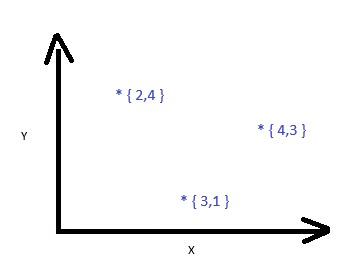
This 2D example shows the direction as the 30 degree angle with a magnitude (length) of 5. For this example {4,3} represents the meaning of some text. This can be understood as a co-ordinate of 4,3 so 4 on the X and 3 on the Y axis. This a point in 2 dimensional space.
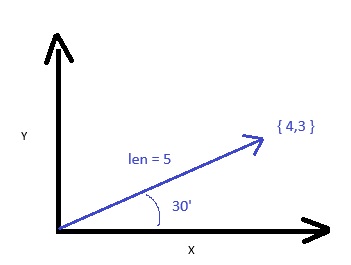
You can then imagine several vectors in this 2D space
3D Example Vector
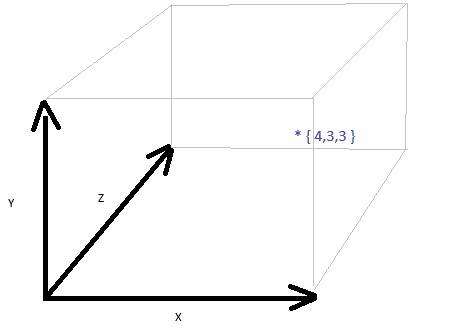
Vectors can be as many divisions as you like and in machine learning typically have 100s or 1000s of dimensions but anything more than 3D is hard to draw.
512 Dimensions
Example vector with 512 dimensions, these numbers have been normalized to be between -1 and +1. This is an array of 512 floating point numbers, my example below has been simplified to just have 24 for readability.
1 | [-0.03503418, -0.024047852, 0.05895996, 0.031433105, -0.039367676, 0.0027675629, 0.045806885, -0.02381897, 0.007911682, 0.033081055, -0.00030350685, 0.015609741, 0.0046920776, 0.044708252, 0.009407043, -0.03201294, -0.016052246, -0.045654297, 0.08605957, 0.05105591, 0.06854248, 0.030715942, -0.06970215, -0.010292053, ...] |
Vectors are useful because they allow you to do calculations when doing Machine learning and AI. Vectors can be fed into neural networks. The basic math could be finding out how similar 2 vectors are to each other, this is the technique that underpins semantic search.
How Many Dimensions Should I Use
The world is bigger than 512 Dimensions but it doesnt have to be! There isn’t a single “correct” vector size for RAG, so I usually think about it like this:
- 384: common in older Sentence Transformer and MiniLM-style models; best for lightweight local deployments or very large corpora where storage and speed matter most.
- 512-768: common in many open-source embeddings; a practical balance of retrieval quality, RAM usage, indexing speed, and query latency.
- 1024: used by models like BGE Large; useful when you want a noticeable quality lift and can afford higher compute/storage.
- 1536: used by models like OpenAI
text-embedding-3-small; strong retrieval quality for production systems without jumping to the largest vector size. - 3072: used by models like OpenAI
text-embedding-3-large; best when you’re chasing maximum retrieval quality and can absorb much higher storage and memory costs (for example, roughly 6x the storage of a 512-dimensional vector).
So why not always use more dimensions?
- Pro: Can capture more semantic information and often improves retrieval quality.
- Con: Increases storage, RAM usage, indexing time, and query latency, with diminishing returns after a point.
The more important factors are often: Chunking strategy. Embedding model quality. Metadata filtering. Re-ranking.
Semantic Vs Keyword Search
In my experience, this is where keyword search starts to show its limits.
Keyword search is basically string matching. If I search for aspnet core dependency injection scopes, it will mostly rank content containing those exact words (or close variants). That is great when the wording is precise, but it can also return irrelevant hits that only share tokens, and miss good content that uses different phrasing, like a post titled service lifetimes in .NET.
Semantic search works differently. Instead of matching words directly, we convert each document into an embedding vector and store it in a vector database. At query time, we do the same conversion for the user’s question, then fetch the nearest vectors. “Nearest” here means closest in meaning, not closest in exact wording.
A useful way to think about it:
- Keyword search asks: “does this text contain the same words?”
- Semantic search asks: “does this text mean something similar?”
So if someone searches for how to reduce cloud spend, semantic search can still find posts written as cutting infrastructure costs because those ideas land near each other in vector space.
Behind the scenes there is no explicit human label like “cost-optimization” attached to each post by default. The model encodes meaning as high-dimensional numbers (often hundreds or thousands of dimensions), and related content naturally clusters together. We can visualise this in 2D or 3D for teaching like I did above, but the real representation is much higher dimensional.
The retrieval step is then: embed the query, calculate similarity against stored vectors, and pull back the closest chunks. Those chunks become the context we pass to the LLM.
In practice, I treat keyword search as a good baseline and semantic search as the better option when users phrase things in many different ways.
Chunk Techniques
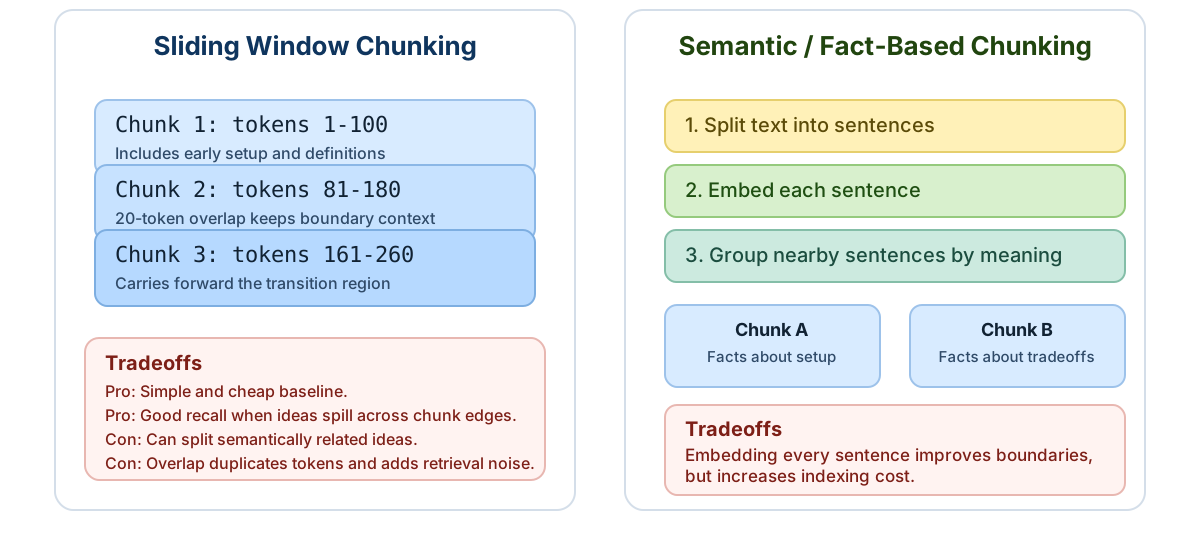
Chunking is one of the biggest levers in RAG quality: sliding windows preserve local context, while semantic grouping keeps related facts together. Too small and you lose context. Too big and retrieval gets noisy.
Sliding Window Chunking
This is the classic baseline, aka naive sliding windows. You split text into fixed-size chunks (usually by token count) and add overlap so context carries across boundaries.
For example, if chunk size is 100 tokens with 20-token overlap:
- Chunk 1 = tokens 1-100
- Chunk 2 = tokens 81-180
- Chunk 3 = tokens 161-260
The overlap helps when an important idea spans the edge of two chunks.
A useful subset technique is header carry-forward (boundary-aware sliding windows). When a new paragraph starts under a heading, prepend that heading (or short section label) to the next chunk as well, even if it was already present in the previous chunk. This gives the retriever explicit topic context at boundaries and helps the chunk keep its meaning when viewed in isolation.

Semantic/Fact-Based Chunking
Instead of splitting by raw token count, you split by meaning. A common approach is:
- Split into sentences.
- Embed each sentence.
- Group neighboring sentences that are semantically close into one chunk.
This tends to produce cleaner topic boundaries (facts stay with related facts), which can improve retrieval precision.
The tradeoff is cost: sentence-level chunking is expensive because you create vectors for every sentence before grouping.
In practice, I treat it like this:
- Start with sliding window for a strong, cheap baseline.
- Move to semantic/fact chunking when precision matters and the extra embedding cost is acceptable.
Hypothetical Document Embeddings (HDE)
HDE is a retrieval trick I reach for when normal semantic search keeps missing the intent.
The idea is simple: instead of embedding the raw user question, you first ask a model to write a short hypothetical answer/document that looks like the kind of passage you hope to retrieve. Then you embed that generated text and use it for vector search.
Why this helps: user questions are often messy (half memory, wrong terms, vague clues). A generated mini-document can be much closer to how your corpus is written, so nearest-neighbor search has a better chance of landing on the right chunks.
Nerd example:
- Assume the corpus has .NET docs/posts about
IServiceCollection,ServiceLifetime, andAddScoped. - User query:
what was that thing in asp net where one object is reused per web request but not app wide - Plain query embedding can over-index on fuzzy terms like
reusedandobjectand surface caching/singleton content. - HDE step generates something more document-like, for example:
1 | The user is asking about dependency injection lifetimes in ASP.NET Core. |
Embedding that hypothetical passage usually shifts retrieval toward chunks about AddScoped and per-request scope rather than generic caching/singleton articles.
In practice my flow is:
- Generate hypothetical document from the query (small model is usually fine).
- Embed that document.
- Retrieve top-k chunks from the vector store.
- Answer using retrieved chunks only.
One practical warning: HDE improves retrieval recall in hard queries, but adds extra latency/cost (one extra generation step) and can introduce bias if the hypothetical doc is too confident. I usually keep it short and factual, then still ground final answers strictly in retrieved sources.
Fusion
todo
References
- https://github.com/Dometrain/ai-chatbot-using-your-data-in-dotnet
- https://platform.openai.com/
- this is a plat form that gives API access to LLMs
- https://platform.openai.com/playground/images
- playground to create images from text
- https://platform.claude.com/docs/en/build-with-claude/embeddings
- https://app.flourish.studio/visualisation/28149706/edit
- help visualisation of data
- https://www.pinecone.io/
- Vector database as a service
- https://learn.microsoft.com/en-us/semantic-kernel/frameworks/agent/
- Agent Framework (old semantic kernal)